
Download Hey Octopus – AI‑Powered Learning Paths for Scientific Exploration
Overview
Hey Octopus is a cutting‑edge, AI‑driven platform designed to turn the overwhelming abundance of scientific literature into a clear, actionable learning journey. By gathering information about a user’s interests, existing knowledge, preferred study format, and available time, the system instantly generates a structured syllabus that spans any scientific discipline—from quantum mechanics to marine ecology. Each path includes a balanced mix of open‑access papers, video lectures, interactive simulations, and hands‑on lab suggestions, all arranged in logical milestones that guide learners from foundational concepts to advanced topics.
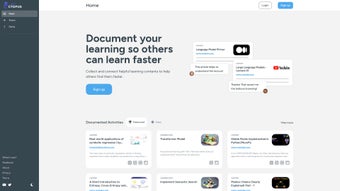
The platform also offers a live community hub where users can publish their custom routes, receive peer feedback, and explore pathways curated by researchers worldwide. This collaborative environment creates a constantly evolving library of vetted resources that stays in step with the latest breakthroughs. With drag‑and‑drop editing, progress tracking, and real‑time AI refinement, Hey Octopus adapts as you learn, ensuring that every new activity aligns with your growing expertise.
The core service is free, secure, and regularly updated, making it an ideal companion for students, educators, and lifelong learners who want a personalized roadmap without the hassle of manual curation.
Key Features and Why They Matter
- AI‑Generated Learning Paths – Analyzes user input and builds a step‑by‑step syllabus tailored to any scientific field.
- Printable PDF Export – One‑click generation of offline‑ready roadmaps for classroom or field work.
- Community Sharing & Collaboration – Publish routes, comment on peers, and co‑create pathways with research teams.
- Dynamic Curated Feed – Continuously refreshed list of open‑access papers, podcasts, webinars, and datasets.
- Interactive Progress Tracker – Mark items complete, add notes, and let the AI refine future suggestions.
- Cross‑Platform Availability – Native apps for Windows, macOS, Android, and iOS with seamless cloud sync.
- End‑to‑End Encryption – Guarantees privacy; no personal data is sold or shared with third parties.
- Free Core Version – All essential tools are available at zero cost; premium add‑ons are optional.
These features address two major pain points in scientific self‑education: direction and relevance. Traditional MOOCs often force learners into a fixed curriculum, leaving them to sift through irrelevant material. Hey Octopus, however, provides a living syllabus that evolves as you interact with content, ensuring every minute spent studying directly supports your overarching goal. The printable PDF export is especially valuable for institutions that still rely on hard‑copy handouts, while the secure, free‑to‑use model removes financial barriers for curious minds exploring niche topics. By combining AI personalization with a vibrant community, the platform creates a self‑reinforcing ecosystem where increased engagement leads to smarter recommendations, higher completion rates, and deeper knowledge retention.
Installation, First‑Time Use, and Compatibility
Step‑by‑Step Installation Guide
Windows 10/11 (64‑bit): Download the installer from the official site, run the .exe file, accept the license, choose an installation folder, and finish the wizard. A desktop shortcut is created automatically.
macOS Catalina or later: Click the .dmg link, open the disk image, drag the Hey Octopus icon into Applications, and launch from Launchpad. macOS may request permission to access the Documents folder for PDF export—grant it to enable offline printing.
Android 6.0+: Open Google Play, search “Hey Octopus”, tap Install, then sign in with your email or create a new account.
iOS 13+: Visit the Apple App Store, locate “Hey Octopus”, tap Get, and authenticate. The app syncs any existing paths from the cloud on first launch.
First‑Time Usage Tips
The onboarding wizard asks three simple questions: (1) Which scientific domains intrigue you? (2) How many hours per week can you dedicate? (3) Preferred content type—papers, videos, or labs? The AI instantly drafts a learning path, complete with suggested resources and a timeline. Users can reorder items, replace suggestions with personal favorites, or click “Add to My Path” on any feed entry. The Progress Dashboard visualises completed milestones, upcoming tasks, and a “Knowledge Gaps” indicator that highlights areas needing extra study.
Supported Operating Systems
- Windows 10 / 11 (64‑bit)
- macOS Catalina, Big Sur, Monterey, Ventura
- Android 6.0 (Marshmallow) and later
- iOS 13 and later
The desktop versions are built with Electron, ensuring a uniform UI across Windows and macOS, while native SDKs power the mobile apps. Automatic updates are delivered via the respective app stores or an in‑app “Check for Updates” button on desktop, keeping the AI models and security patches current.
Pros, Cons, and Frequently Asked Questions
Pros
- Highly personalized AI‑generated paths save time on content curation.
- Free core tier makes advanced scientific exploration accessible to all budgets.
- Community sharing encourages peer‑reviewed resource quality.
- Cross‑platform sync lets you study on any device without losing progress.
- End‑to‑end encryption safeguards personal data and complies with GDPR.
Cons
- Premium analytics (e.g., knowledge‑retention heat maps) require a subscription.
- Initial AI suggestions may need manual tweaking for highly niche sub‑disciplines.
- Real‑time feed requires an internet connection; offline mode is limited to downloaded PDFs.
Frequently Asked Questions
Is Hey Octopus really free?
Yes. The core application—including AI‑generated paths, community sharing, and the curated feed—is completely free. Optional premium features such as advanced analytics, team workspaces, and priority support are offered via a monthly subscription.
Can I export my learning path for offline use?
Absolutely. Hey Octopus provides a one‑click PDF export that formats the entire path into a printable document, complete with resource links, suggested timelines, and space for personal notes.
How does the AI decide which resources to recommend?
The AI combines user‑provided preferences, metadata from open‑access repositories (e.g., arXiv, PubMed), citation networks, and community engagement metrics (likes, completions) to surface relevant and reputable content.
Is my data safe on Hey Octopus?
Hey Octopus uses end‑to‑end encryption, stores data on secure cloud servers compliant with GDPR, and never sells personal information. Users can also choose to keep their learning paths locally on their device.
Can I collaborate on a learning path with a research team?
Yes. The premium “Team Workspace” feature lets multiple members edit, comment, and track progress on a shared learning path, making it ideal for lab groups or classroom projects.
Review Summary: Hey Octopus blends AI personalization with a vibrant community, delivering a free, secure, and highly adaptable learning companion. While the core experience is generous, power users may find value in premium analytics and team collaboration tools.
Conclusion & Call to Action
In a world where scientific publications grow exponentially, Hey Octopus offers a trustworthy, free, and secure way to convert information overload into a clear, actionable learning roadmap. Its AI engine handles the heavy lifting of content discovery, while community features keep the experience fresh, collaborative, and up‑to‑date. Whether you are a graduate student drafting a dissertation, a high‑school teacher introducing cutting‑edge topics, or a curious hobbyist exploring marine ecology, Hey Octopus equips you with a structured syllabus and the tools to monitor progress across any device.
Ready to chart your scientific adventure? Download Hey Octopus now and start building your first personalized learning path today. Join a growing community of explorers turning curiosity into competence—one AI‑curated step at a time.



.png)



